Topview
    • MCP/Skill
    • Plugin
    • API
    • Pricing
    1. Home
    2. AI Video Generator
    3. Dance Video

    AI Ads

    AI Video AgentAI Ads VideoAI Product VideoAI UGC VideoURL to Video

    AI Avatar

    AI Avatar GeneratorProduct AvatarDesign My AvatarAI Lip Sync

    AI Video

    AI Video GeneratorDrama StudioAI Video Body SwapAI Video UpscalerAI Video Watermark RemoverTikTok Watermark RemoverSora Watermark RemoverSubtitle RemoverAI Motion ControlAI Lip SyncURL to Video

    AI Image

    AI Image GeneratorAI Face SwapAI Image Character SwapAI Image UpscalerAI InpaintAI Image Text EditorPhoto Angle EditorAI RelightingAI Product PhotographyAI Virtual Try-OnAI Storyboard GeneratorExtract Color PaletteImage to Prompt

    AI Voice

    VoiceoverAI Voice CloningAI Music Generator

    3D

    3D World Generator3D Shot Composer

    Use Cases

    AdvertisingAffiliate MarketingEcommerceDTC BrandsAI Live Stream

    Resources

    BlogAffiliate ProgramLearning CenterAlternativeAPI

    Company

    Topview StudioPrivacy PolicyTerms
    Topview

    © 2026 TOPVIEW PTE. LTD.

    Singapore: 20 Collyer Quay #20-03, Singapore 049319
    Los Angeles: 15970 Los Serranos CC Dr #251, Chino Hills, CA 91709

    Free AI Dance Video Generator: Can't dance? Turn one still into a 9:16 dance vertical

    Product shots and talent photos sit still—you can't follow the challenge and don't want to dance on camera. Upload a clear half- or full-body photo, write the move into your prompt, add a reference clip if needed, and choose 9:16 so the vertical is ready to post. Start with free credits, regenerate if the take is off, and open Canvas to refine.

    Ask Topview to

    AI Viral Dance Video References: See the look, then write it into the prompt

    These are style references for an AI viral dance video generator—not a built-in template library. Browse challenge energy and opening looks, then write the move into your prompt or upload a short reference clip before you generate.

    Photo to viral dance: TikTok opening-energy reference

    This 9:16 sample shows a high-energy opening—describe the first 2 seconds and arm swing in your prompt, then generate a vertical from your product or talent photo.

    Pop-rhythm AI dance vertical reference

    See how pop-style body movement reads in vertical—write tempo, hip sway, and shoulder bounce into your prompt so the free AI dance video generator can output a TikTok-ready take.

    Challenge-style move: photo to dance video AI reference

    This sample leans into a challenge step sequence—name the move in your prompt, add a reference clip if needed, and iterate with photo to dance video AI until it is postable.

    Share-first openings: write them into the prompt, then test which take posts better

    Put opening energy, framing, and rhythm into the prompt. Run a few takes on the same photo and see which clip fits the posting window.

    Pop rhythm: write it into the prompt, then generate

    Describe pop-style range and tempo in your prompt, then iterate on the same photo until the take matches your account—style reference, not a tap-to-dance template.

    Free AI Dance Video Generator TikTok: Vertical ready to post, no crop

    Generic tools often export landscape first—then the crop cuts off the head and feet. Choose 9:16, duration, and resolution when you generate so the clip matches TikTok, Douyin, and Reels. The free AI dance video generator TikTok use case is just getting the spec right once.

    Photo to Dance Video AI: A still can still make a postable clip

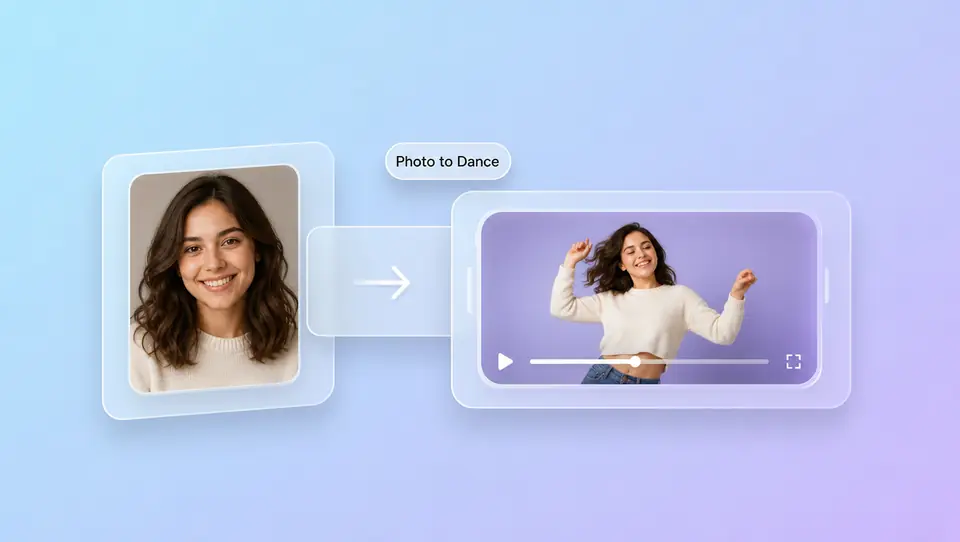
    This is the usual path for an AI dance generator from photo—and the starting point for a free image-to-dance try. Upload a sharp portrait or talent shot, write the move in text, and optionally attach audio or a reference video. Not a studio recast: a dance-style clip you can actually post.
    Free AI dance video: try first, then scale

    Chasing a posting window without betting on a locked template? Use the free AI dance video generator on your own photo, then scale when the direction feels right—no subscription required to start.

    How to use an AI dance video maker (3 steps)

    1. 1

      Start with a half- or full-body product or talent shot. Write the dance move into the prompt; attach audio or a reference video if you need them.

    2. 2

      Pick the TikTok ratio, set duration and resolution, then generate. The vertical is ready—no landscape crop. There is no built-in dance template picker.

    3. 3

      Watch the clip. Change the prompt or photo and generate again. Need finer edits? Open Canvas and keep refining until it is ready to post.

    FAQs

    Yes. Upload a clear half- or full-body photo, write the move into your prompt, and optionally add a reference video. That is the usual photo to dance video AI path: no studio, no filming yourself, first a shareable 9:16 dance-style clip.

    Use free credits to upload a photo, write the move, set 9:16, duration, and resolution, then generate. Try a few openings for free; upgrade when the direction feels right.

    Yes. Choose 9:16 so the vertical is ready—no landscape crop. You can post to TikTok, Douyin, or Reels. Add trending audio from the official library when you publish; the generator does not clear music rights for you.

    Topview is not a tap-a-template dance console. Write the move and opening energy into your prompt, or upload a reference clip. That is the usual AI dance generator from photo path—not one-tap replication of this week’s challenge.

    Start with a front-facing photo, shoulders and torso visible, clean light. If the take is off, revise the prompt or swap the photo and generate again, or open Canvas to tweak. Fast, complex choreography is not guaranteed to stay clean—iteration beats betting on take one.

    No auto beat-sync promise. You can attach audio as a reference, but exports are often silent. Add sound from TikTok’s official library when you post so a bundled hit file is less likely to get muted.

    Sharp half- or full-body product and talent shots are the most stable. Pets and character art can be tried too—including the AI cat dance video clips people search for—if the subject is clear and unobstructed. Side angles or poor light usually need another take.

    Free AI Dance Video Generator: ship the first vertical today

    Generate free from one still into a 9:16 dance-style clip. Retry if the take is off, then open Canvas until it is ready for TikTok.

    Start free