

Topview
    • MCP/Skill
    • Plugin
    • API
    • Pricing
    1. Home
    2. Seedance 2

    AI Ads

    AI Video AgentAI Ads VideoAI Product VideoAI UGC VideoURL to Video

    AI Avatar

    AI Avatar GeneratorProduct AvatarDesign My AvatarAI Lip Sync

    AI Video

    AI Video GeneratorDrama StudioAI Video Body SwapAI Video UpscalerAI Video Watermark RemoverTikTok Watermark RemoverSora Watermark RemoverSubtitle RemoverAI Motion ControlAI Lip SyncURL to Video

    AI Image

    AI Image GeneratorAI Face SwapAI Image Character SwapAI Image UpscalerAI InpaintAI Image Text EditorPhoto Angle EditorAI RelightingAI Product PhotographyAI Virtual Try-OnAI Storyboard GeneratorExtract Color PaletteImage to Prompt

    AI Voice

    VoiceoverAI Voice CloningAI Music Generator

    3D

    3D World Generator3D Shot Composer

    Use Cases

    AdvertisingAffiliate MarketingEcommerceDTC BrandsAI Live Stream

    Resources

    BlogAffiliate ProgramLearning CenterAlternativeAPI

    Company

    Topview StudioPrivacy PolicyTerms
    Topview

    © 2026 TOPVIEW PTE. LTD.

    Singapore: 20 Collyer Quay #20-03, Singapore 049319
    Los Angeles: 15970 Los Serranos CC Dr #251, Chino Hills, CA 91709

    Seedance logo
    Seedance 2.0
    on
    Topview logo
    Topview

    Seedance 2.0 — The All-in-One Model forInfinite Creativity

    Make a video from a prompt, a still image, or reference files. You can try Seedance 2.0 on Topview without a credit card.

    Seedance 2.0 AI Video Generator
    Streetwear reference jacket front view
    @Image1
    778/3500
    View APITry Seedance 2.5
    Seedance showcase preview

    What Is Seedance 2.0?

    Seedance 2.0 is ByteDance Seed's video model. It generates the picture and the soundtrack together from a text instruction, and that instruction can also use images, audio, and video as references.

    Those references can guide composition, motion, camera movement, effects, and sound. ByteDance's public launch notes describe up to 9 images, 3 video clips, and 3 audio clips with the text, 15 reference files in total, and they include extending or editing a clip in the same model. On Topview, Seedance 2.0 outputs at up to 4K. You start from a prompt, a still image, or reference files. More prompt examples are in the Seedance 2.0 prompts. The examples below are clips made in that workflow.

    Explore the Most Popular Seedance 2.0 Use Cases

    These showcase categories are reordered around what paying users actually make most often: film-style scenes, fashion and beauty content, music and dance, ads, viral social concepts, and explainers. Each clip below keeps the prompt used for that example. More starting prompts are in the 50+ Seedance 2.0 prompt templates.

    Cinematic narratives with professional pacing. Explore modern tactical operations, mythological encounters, sci-fi thrillers, and surrealist social satire.

    Tactical Breach and High-Speed Escape

    A modern tactical team breaches a corridor with an explosion. Transition to a man in a suit escaping via elevator to a garage, driving off in a silver sedan while the team exits in a pickup.

    Realistic Modern Action16:915s

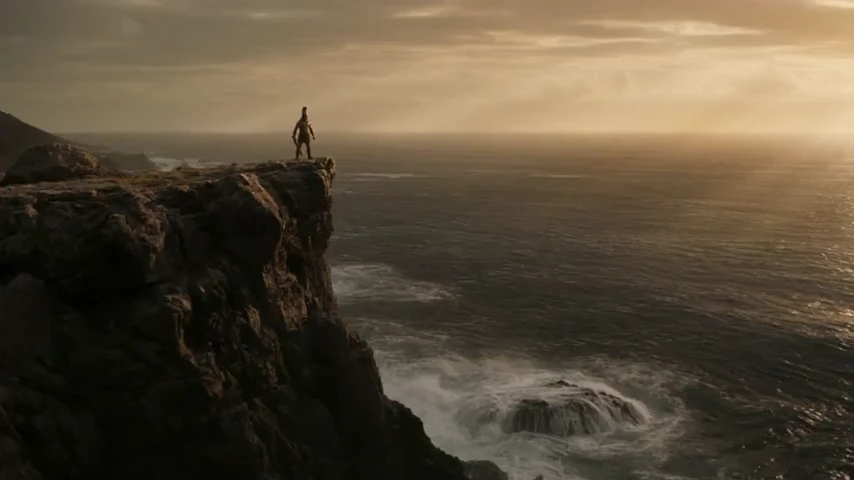
    The Spartan's Celestial Encounter

    A Spartan-style warrior stands on a cliff edge. A massive glowing humanoid silhouette descends from the sky, reaching out a divine finger toward the warrior's raised sword.

    Epic Mythological CG16:915s

    The Morgue Anomaly: Sci-Fi Thriller

    A female doctor uncovers a corpse in a morgue to find a terrifying rift lined with teeth on the neck. The sequence ends with a sudden, unsettling twitch of the corpse's fingers.

    3D Sci-Fi Thriller16:915s

    Urban Warfare: Sunset Vigil

    A soldier survives a building explosion in a narrow alley, moves through thick smoke into ruins, and ends on a rooftop keeping watch against a dramatic city sunset.

    Documentary War Film16:915s

    Seedance 2.0 Advanced Model Capabilities

    These examples show how Seedance 2.0 handles motion, light, transformations, faces, product presentation, and camera movement. The prompt under each clip is the prompt used for that example.

    Realistic Motion & Impact

    Fast action stays coherent - clean timing, believable contact, and fewer weird body glitches.

    Prompt

    "CG style, cinematic 3D animation. Female soldier, short blonde hair, full tactical gear, combat boots, holding assault rifle. Snowy industrial ruins background, debris, cold atmosphere. High-octane action sequence character sliding on snow while shooting, performing martial arts kicks on masked enemies, sprinting. Dynamic camera angles, motion blur, Unreal Engine 5 render, hyper-realistic lighting, 8k resolution."

    Cinematic Lighting & Composition

    Get film-like framing and lighting with more consistent color and depth - less "flat AI look."

    Prompt

    "A 1920s-style modern woman with a black bob and pearls walks down a tiled basement staircase at night. The camera tracks backward just below her chin, capturing her expression under soft, directional overhead lighting. The scene features a dreamlike film noir aesthetic with blue-green tones, mist, and balanced exposure, ensuring her face is contoured but visible."

    Seamless VFX Transformations

    Magical outfit swaps and style transitions that maintain perfect body consistency.

    Prompt

    "Using the content structure of this [video] as a reference, generate a costume-change effect video for this character [image1]"

    Natural Facial Performance

    Subtle expressions read better on camera - more believable emotion, fewer "dead face" moments.

    Prompt

    "A two-part commercial video sequence. Shot 1: An elegant woman stands in a bright, modern indoor room, extending her hand to hold a glass serum bottle close to the camera lens while talking and explaining the product details. Focus on the bottle texture and her engaging expression. Shot 2: The scene cuts to the interior of a luxury car with leather seats. The same woman sits in the driver's seat, holding a small bottle of essential oil up towards the camera, continuing her presentation with natural daylight streaming through the car windows."

    AI Influencer E-commerce

    Generate high-converting product showcases with realistic human movements.

    Prompt

    "The character from Image 1 picks up the bag from the ground, rotating it to present a 360-degree view. They then hold it forward to showcase the handle details and decorative charm. Finally, they stand up, sling the bag over their shoulder, and pose to demonstrate the upper body fit while introducing the product."

    Cinematic Drone Perspectives

    Stunning aerial views of historical landmarks with smooth camera paths and high-fidelity textures.

    Prompt

    "Photorealistic 15s FPV drone shot, wide-angle 16mm lens, continuous \"one-take\" style with high-tension movement and motion blur. The camera dives from high-altitude backlit clouds, seamlessly transitioning to a fast spiral close to the Eiffel Tower, weaving through its steel beams. It then cuts to a low-altitude rush through the arches of the Roman Colosseum, pulling up vertically into a bright sun flare."

    Seedance 2.0 Highlights for Creators

    Audio-Visual Sync

    Audio + Video, Generated Together

    Create a complete clip in one pass so visuals and sound land on the same beat with less cleanup in post. This is one of Seedance 2.0's biggest workflow advantages over prompt-only competitors.

    One-pass | Synced beats | Less post-fix

    Multi-Shot Sequences

    Multi-Shot in One Generate

    Type the scene once and generate a structured sequence with cuts, angles, and pacing for up to 15 seconds in one pass. It is built for short narrative arcs, not just one isolated shot.

    Up to 15s | Fewer stitches | Smoother arcs

    Dialogue and Interaction

    Multi-Character Dialogue and Interaction

    Stage scenes where multiple characters speak and react naturally, making conversations feel more watchable and less synthetic. This helps Seedance 2.0 work for ads, explainers, and story-first creator content.

    Natural speech | Reactions | Watchable

    Style Versatility

    Multi-Style Output

    Switch quickly from cinematic drama to anime or ad-clean visuals without rebuilding your prompting workflow from scratch. Teams can test more concepts inside one production system.

    Cinematic cuts | Guided pacing | Cohesive flow

    How to Use Seedance 2.0

    Enter a prompt step for Seedance 2.0
    Step 1

    Choose how to start

    Use Text to Video when you only have a description. Use Image to Video when a still should move. Use Multi Reference when images, video, or audio should guide the clip.

    Generate video step for Seedance 2.0
    Step 2

    Describe the clip

    Say what should happen and what should stay the same. If you add files, say what each file is for.

    Download video step for Seedance 2.0
    Step 3

    Generate and download

    Start the render, then download the file when it is ready. In one test, a text-to-video clip at 9:16, 1080p, and 5 seconds took about 120 seconds. Other settings and queue conditions can take a different amount of time.

    Model Parameters

    These are the core Seedance 2.0 specs most relevant to creators evaluating output quality, control depth, and production fit.

    Model

    Seedance 2.0

    Dual Branch Diffusion Transformer

    Generation Speed

    ~2 minutes

    About 30% faster than the previous version

    Total Mixed Inputs

    Max 15 files

    Combined across all modalities

    Resolution

    480p / 720p / 1080p / 4K

    Flexible output options for faster drafts or higher-detail delivery

    Duration

    4s - 15s per shot

    Extendable via multi-shot chaining

    Frame Rate

    24fps

    Cinema-standard output

    Aspect Ratios

    16:9, 9:16, 1:1, 4:3, 3:4, 21:9

    6 supported formats

    Image Inputs

    Up to 9

    Style, character, and scene references

    Video Inputs

    Up to 3 clips

    Motion transfer and camera reference

    Audio Inputs

    Up to 3 files

    Beat sync, lip-sync, and atmosphere

    Text Input

    Natural language

    Detailed scene, pacing, and direction control

    Audio Output

    Dialogue + SFX + Music + Lip-sync

    8+ languages, auto-generated

    Where Seedance 2.0 Sits

    Seedance 1.5 Pro is an earlier Seedance release. Seedance 2.0 is the model on this page. Seedance 2.5 is the newer model, and it is the version Topview currently features first. Stay on this page for Seedance 2.0. Open Seedance 2.5 for the newer release, or read the Seedance 2.5 vs Seedance 2.0 comparison for a version-by-version page. A lighter Seedance 2.0 option is Seedance 2.0 Mini.

    What's New in Seedance 2.0 Compared with Seedance 1.5 Pro

    Compared with Seedance 1.5 Pro, Seedance 2.0 expands the reference inputs, raises the output ceiling, and brings native audio and editing into the same workflow.

    CapabilitySeedance 1.5 ProSeedance 2.0Improvement
    Max Resolution480p4KUp to 4K
    Generation SpeedBaseline30% fasterFewer wait times
    Max Duration5-10s4-15sLonger story arcs
    Image InputsUp to 3Up to 93x more references
    Video InputsNot supportedUp to 3 clipsNew capability
    Audio InputsNot supportedUp to 3 filesNew capability
    Total Mixed InputsMax 3Max 15 files5x input capacity
    Native AudioNot supportedDialogue, SFX, lip-syncLess post-production
    Video EditingNot supportedReplace, add, remove, extendNew editing layer
    Aspect Ratios3 formats6 formats2x more flexibility
    ArchitectureDiTDual Branch Diffusion TransformerNext-gen stack
    Multi-shot StorytellingLimitedFull multi-camera storytellingNarrative quality
    Character and Physics ControlBasicAdvanced face, clothing, style, and physics lockProduction-grade consistency

    Seedance 2.0 vs Sora 2 vs Kling 3.0 vs Veo 3.1 - Model Comparison

    Choosing the right AI video model matters. This comparison focuses on the features that most affect creators, marketers, and production teams in 2026: duration, native resolution, multimodal inputs, audio, editing, speed, and overall workflow control.

    FeatureSeedance 2.0Sora 2Kling 3.0Veo 3.1
    DeveloperByteDanceOpenAIKuaishouGoogle
    Max Duration15s12s10s8s
    Max Resolution4K1080p1080p1080p
    Native AudioDialogue + SFX + lip-syncGenerated audioGenerated audioGenerated audio
    Image InputsUp to 911-21-2
    Video ReferenceUp to 3 clipsNoNo1-2 clips
    Audio ReferenceUp to 3 filesNoNoNo
    Multi-Shot SequencesYesYesNoYes
    Video EditingYesNoNoNo
    Multi-Language Lip-sync8+ languagesLimitedLimitedLimited
    Approx. Cost (10s 1080p)~$0.60~$1.00~$0.50~$2.50
    Generation Speed~2 min~3 min~1 min~2.5 min
    API AvailableFullLimitedFullFull
    Best ForMultimodal control and storytellingPhysics realismSpeed and valueCinematic polish

    Seedance 2.0 is the option in this comparison with image, video, and audio references together with editing. That combination fits creators and marketers who want those controls in one workflow. For models beyond this table, .

    Who Should Use Seedance 2.0 on Topview

    The clips above are different jobs. Seedance 2.0 fits when you already know the scene: a short film beat, a product story, a performance, a campaign cut, a social hook, or a result driven by a file you already have.

    Filmmakers and story-first creators

    Use Seedance 2.0 when the prompt needs framing, camera language, pacing, and more than one angle in the same generation. If you want to plan the shots before you write that prompt, the AI storyboard generator is a separate planning tool.

    Fashion, beauty, and shopping teams

    Seedance 2.0 can carry a model shot, a routine, a jewelry detail, or a product turn. When the job starts from a product image or a product URL and follows an ecommerce template, use the AI product video generator.

    Music and dance creators

    Seedance 2.0 can generate the performance visual. If you still need the track, create it with the , then add an audio file when the Seedance generator gives you an audio reference.

    Marketing, brand, and paid social teams

    One scene often has to become a hook, a launch cut, and a placement variant. Describe those versions in the prompt. Topview's cover campaign types beyond this model page.

    Social, pet, and trend creators

    Trend hooks, pet clips, skits, and POV shots can be prompted here as short scenes. The is a separate tool for UGC, avatars, and URL-to-video workflows.

    People starting from a file

    Use Image to Video or Multi Reference when you already have a still, a clip, or audio. The is the broader Topview video tool when you are not staying on Seedance 2.0.

    Questions Before You Generate

    It depends on the mode and the settings. In one Topview test, text to video at 9:16, 1080p, and 5 seconds used 12.5 credits. A different duration, resolution, aspect ratio, or reference setup can use a different amount. Current plans are on the Topview pricing page.

    Stay here when you want Seedance 2.0. Seedance 2.5 is the newer model and the one Topview currently features first.

    No. Text to video only needs a description. Add an image or another reference when the result has to follow a person, product, motion, or sound you already have.

    You can generate a new version from an existing clip. Describe what should be replaced, added, removed, or extended, and attach the clip when a video reference is available.

    That depends on your plan and the terms that apply when you export. Read those terms before you publish the clip. Plan details are on the pricing page.

    Yes. Seedance 2.0 can generate visuals and audio in a single pass, which helps timing, speech, sound effects, and pacing feel more aligned. This reduces the amount of manual post-production work needed after the first render.

    Seedance 2.0 can generate clips from 4 to 15 seconds per shot. That range is enough for short ads, creator hooks, explainers, and structured multi-shot sequences that still feel complete.

    Yes. You can describe shot order, pacing, and scene progression in one prompt, and Seedance 2.0 can return a structured multi-shot sequence. This is useful for short narrative arcs where you want more than one camera moment in a single render.

    Yes. Seedance 2.0 is designed to support scenes where multiple characters speak, react, and share screen space more naturally. This makes dialogue-heavy content easier to watch and more practical for marketing and storytelling use cases.

    Write the scene like a short storyboard with clear shot order, camera language, pacing, and mood. Prompts that describe transitions and emphasis directly usually perform better than vague requests for a cinematic look.

    Keep names, appearance details, clothing cues, and role descriptions stable from shot to shot. It also helps to iterate with small prompt edits instead of rewriting the entire scene objective every time.

    On Topview, Seedance 2.0 can output at up to 4K. Lower resolutions such as 480p, 720p, and 1080p are still available when you want a faster draft.

    Use of real human face references depends on the latest platform policy and workflow rules. In many production-safe setups, teams use approved virtual characters, AI-generated portraits, or licensed assets to keep identity control consistent across shots.

    Dual Branch Diffusion Transformer is Seedance 2.0's core architecture for processing visual and audio signals in parallel branches. This design helps the model align video and sound more precisely while improving motion quality, multimodal coherence, and frame-level synchronization.

    Try Seedance 2.0 on Topview

    Start from a prompt or a file you already have. Generate cinema-grade, physics-accurate video from text or images directly in your browser with Seedance 2.0.

    See Pricing Plans

    Third-party model and brand names are trademarks of their respective owners. Topview provides access to supported AI models through its independent platform and is not the developer of those third-party models.

    explore more AI video models
    AI music generator
    advertising use cases
    short-form video generator
    AI video generator

    Topview API

    Build with Seedance 2.0 API at a Better Price

    Bring cinematic AI video generation into your application with Topview API. Access Seedance 2.0 for text-to-video, image-to-video, and reference-guided workflows with transparent pricing and developer-ready documentation.

    Key Benefits

    • Competitive Pricing — Save on video generation costs.
    • Flexible Workflows — Text, image, and multimodal reference inputs.
    • Easy Integration — REST API access with clear documentation and code examples.

    15% below listed official price

    $0.1285/ second

    $0.1512 / second — Listed official price

    720p · No reference video · 16:9 · 24fps

    Explore Seedance 2.0 APIDocumentation

    Reference rate for the configuration shown. Pricing varies by settings and usage. API pricing is separate from Topview's web generator credits.